http://ask.wireshark.org/questions/1281/npf-driver-problem-in-windows-7
應該是我換了新版的Wireshark和Wincap後,npf被設定成了demand start,
參考上面連結,很清楚的可以設定為auto-start。
Run a cmd.exe as administrator and run the command sc qc npf.
You should get some output like this:
C:\Windows\system32>sc qc npf
[SC] QueryServiceConfig SUCCESS
SERVICE_NAME: npf
TYPE : 1 KERNEL_DRIVER
START_TYPE : 2 AUTO_START
ERROR_CONTROL : 1 NORMAL
BINARY_PATH_NAME : system32\drivers\npf.sys
LOAD_ORDER_GROUP :
TAG : 0
DISPLAY_NAME : NetGroup Packet Filter Driver
DEPENDENCIES :
SERVICE_START_NAME :
If your driver is not properly started, activate it with the command sc start npf
Finally, to start the service automatically, use the command sc config npf start=auto
Remember to run your cmd.exe as administrator when issuing these command.
Showing posts with label ComputerSkills_電腦小技巧. Show all posts
Showing posts with label ComputerSkills_電腦小技巧. Show all posts
Wednesday, March 2, 2011

Monday, September 27, 2010
開啟Windows7的Telnet功能
果然很多人遇到同樣問題,順便了解一下怎麼修改你的Win7功能和服務吧!
http://vbagbk.pixnet.net/blog/post/25127665
http://dreamtails.pixnet.net/blog/post/24588075
http://steachs.com/archives/1559
http://vbagbk.pixnet.net/blog/post/25127665
http://dreamtails.pixnet.net/blog/post/24588075
http://steachs.com/archives/1559
Friday, September 10, 2010
Drivers for Asus W5G00AE
I have one Asus W5G00AE installed windows 7.
Someone shared the experience to install drivers of W5G00AE.
According to the author's suggestions, drivers of W5G00AE is compatible with K50IN. http://support.asus.com/download/download.aspx?SLanguage=en-us&model=K50IN
Bluetooth is Bluetooth_BT253_WIN7_32_WIN7_64_6209600.
VID is USB\VID_044E&PID_3001&REV_1392.
You can download the latest version from Eee Box B206. (The suggestion of latest driver is from DriverUpdater)
WebCam is downloaded from here. http://support.asus.com/download/download.aspx?SLanguage=en-us&model=Camera
The VID of webcam is USB\VID_0402&PID_5602&REV_0100.
You can check the Hardware ID in properties of Webcam and select right driver for your device.
How to check which brand of your web cam. http://support.asus.com/faq/asus-faq.aspx?SLanguage=en-us&no=02B6B989-4468-5237-CB04-BCF5B9FE9714
But
Additional problem will come out "Can't support ASF file format.
I tried to use latest version of lifeframe, but lifeframe2 and lifeframe3 doesn't support W5G00AE.
Some forums talked about this issue. http://5i01.com/topicdetail.php?f=233&t=1016939&last=11472334
Even I tried the lifeframe patch, the problem still exists.
BTW, if you want to update the webcam drivers to later version. You can try the webcam driver of Asus A6Km.
Wireless Console 3 is working well on W5G00AE.
Maybe you will see one device which is not installed driver, VID is PCI\VEN_1180&DEV_0592&SUBSYS_00000000&REV_08.
It is Ricoh Card reader driver. You can install W5AE version.
I also hope to update the latest Audio driver, but I failed.
DriveUpdater suggests Realtek 5.10.0.6043, my version is 5.10.0.5178.
Saturday, August 29, 2009
Asus PL-X31電力網路實測和配置
PLC Power Line Communicattion,電力線通訊自從開始有商業化產品後,我就一直再注意了。
因為一定會有速度更快的,價錢更理想的產品推陳出新,終於200M的出來了。
產考了價錢和許多網友的分享文,
我決定買Asus的PL-X31。
官方介紹


 在書房的另一台一公升電腦,連線速度是9.4Mpbs
 在臥房的PC,沒透過PLC的連線速度,9.7Mpbs。

 在臥房連線客廳的無線路由器,連線速度是6.7Mpbs。

我買了三台PL-X31,分別放在三個房間,我的臥室,客廳,和書房(娛樂間)。
網路來源就透過ADSL modem,再加上一台比較強效的無線路由器,來分配網路位址。
我申請的是一個實體IP加上七個虛擬IP的ADSL網路服務。
客廳需要網路的原因是因為想利用一台一公升電腦當作娛樂中心,透過此電腦可以在電視上欣賞影片,MOD(高畫質電視節目)也可以使用。
另外的好處就是電視遊樂器也可以很方便在客廳連接上網路。(特別是Xbox360和未來會加入的PS3 Slim)
書房是家庭成員使用電腦的地方,所以一定要提供網路。
如果沒有PLC,光是佈線就非常頭大!
那使用者最在乎的速度呢?實測後,PL-X31真的提供了很不錯的效果!應該說200M規格以上的,應該都符合大多人的需求了。
以下是粗糙的連線速率結果,只測一次,沒有做多次取平均,不過基本上都差不多。
在書房的PC,連線速度是8.5Mpbs。

在書房的NB,連線速度是9.7Mpbs

在客廳的一公升電腦,連線速度是8.4Mpbs。
 在書房的另一台一公升電腦,連線速度是9.4Mpbs
 在臥房的PC,沒透過PLC的連線速度,9.7Mpbs。
在臥房連線臥房內的無線路由器,連線速度是8.9Mpbs。
 在臥房連線客廳的無線路由器,連線速度是6.7Mpbs。
沒透過PLC速度是9.7Mbps。
有透過PLC速度分別是8.5Mbps, 9.7Mbps, 8.4Mbps。
無線的速度分別是8.9Mbps, 6.7Mbps。
由此可見,透過PLC甚至跑出沒透過PLC一樣的速度,雖然僅供參考,但是已經表示原本有限網路的100M,已經和PLC 200M有並駕齊驅的表現了。
看似無線效果也不錯,但是其實這是最好的狀況,我也沒特定去找死角來測,有些房間要收到無線訊號其實不是很容易。
我應該會把客廳的無線AP拿到書房去,這樣起碼可以將整個家以無線網路涵蓋起來,另外要使用有線網路的話,有三個地方可以提供,有需要的話,再添購PLC即可。
總之,PLC真是好物啊!
Wednesday, May 13, 2009
Conflict problem between IntelProSet and Hcontrol
I have a problem on my laptop (W5g00AE) disrupting me for a long time and it is getting more and more serious.


It's a software conflict problem between IntelProSet Apps and Asus ATK100, actually the problem is hcontrol.
The condition is unstable, sometimes is good, other is not. And it also effect the TKIP protocol to access wireless probably.
ATK100 is included a software called hcontrol which manage the function keys, audio switch, wireless/bluetooth switch, etc.
You can download the lastest version of ATK100 in Asus download service webpage,
Category is Notebook->W5000 Series->W5AE (W5g00AE)->Others
Somone provided a good solution in Chinese.
After all, you can use new driver (9.0.4.17, my old driver version is 9.0.19) with old IntelProSet application.
Don't execute the installer from Asus webstie. Just update your driver by hardware manager. It's much safer.
But I got a problem with conflict on family code of IntelProSet apps, and I cannot use Apps in old version. I think there is a process to check version of driver and version of apps.
Hope you are more lucky than me. I uninstall the IntelProSet and use the lastest wireless driver now. Of course, hcontrol is working fine now.
Something happened after I reinstall drivers and apps. I can install apps in old version now.
And then I have 2 solutions now.
- Update driver only and use old veriosn apps
- Use the lastes apps and driver from IntelProSet
I tried another solution. Direct download from website from IntelProSet,
The driver of wireless is updated to 9.0.4.39 and the apps is still conflicting with hcontrol.
So I copy the lastest driver folder in Program Files/Intel/Wifi/, uninstall all lastest apps and install old apps.
So far, it's stable now. I use the latest driver, 9.0.4.39 without IntelProSet and hcontrol is working.
Friday, April 3, 2009
遺失HAL.dll檔
如果電腦開機後,出現此訊息,
Windows 無法啟動,因為下列檔案遺失或損毀:
Windows\System32\Hal.dll
修復方法有
1. 就想辦法複製一份Hal.dll進去,有曾經修復過,不過我覺得不是正確作法,而且有時候此檔案還在,你可以嘗試複製新的進去,舊的先保留起來。如果還是不能啟動WINXP,就嘗試2。
2. 原版光碟開機,啟動修復管理員,輸入 copy hal.dll C:\Windows\system32\hal.dll。也是要注意如果舊的hal.dll還在,最好先改名稱,備份起來。
3. 若發生原因是如果 Boot.ini 檔遺失、損壞或包含不正確的項目,則可能發生此問題。就用拿原版XP光碟啟動,修復Boot.ini囉!
參考
http://60.248.128.85/bbs/dispbbs.asp?boardID=67&ID=18584&page=1
http://blog.yam.com/ajuang/article/1272723
http://tw.myblog.yahoo.com/minicaesar/article?mid=119
http://tw.myblog.yahoo.com/ceyi-udwebs/article?mid=55&prev=-1&next=54
因為我的電腦原本有Ubuntu,所以開機後變成有兩個XP,一個 Ubuntu,反正不管了,以後有時間再處理。
Boot.ini錯誤的原因,應該是因為我用ubuntu玩Gparted的後遺症,不能說Gparted不好,因為我的C槽剩太少空間,重整也沒辦法把檔案整理乾淨,所以可能會使Gparted運作不良吧?或許,我亂猜的。
這次,是用bootcfg /rebuild救回來的。
Windows XP修復主控台的指令請參考如下:
Attrib 變更檔案或目錄的屬性。
Batch 執行文字檔中指定的指令。
Bootcfg開機檔案 (boot.ini) 設定及修復。
Chdir (Cd) 顯示目前目錄的名稱,或變更目前的目錄。
Chkdsk 檢查磁碟並顯示狀態報告。
Cls 清除螢幕。
Copy 將單一檔案複製到其他位置。
Delete (Del) 刪除一個或多個檔案。
Dir 顯示目 ..
參考
http://bbs-mychat.com/reads.php?fsz=b&fid=351&tid=202736&page=e
Windows 無法啟動,因為下列檔案遺失或損毀:
Windows\System32\Hal.dll
修復方法有
1. 就想辦法複製一份Hal.dll進去,有曾經修復過,不過我覺得不是正確作法,而且有時候此檔案還在,你可以嘗試複製新的進去,舊的先保留起來。如果還是不能啟動WINXP,就嘗試2。
2. 原版光碟開機,啟動修復管理員,輸入 copy hal.dll C:\Windows\system32\hal.dll。也是要注意如果舊的hal.dll還在,最好先改名稱,備份起來。
3. 若發生原因是如果 Boot.ini 檔遺失、損壞或包含不正確的項目,則可能發生此問題。就用拿原版XP光碟啟動,修復Boot.ini囉!
如果要解決此問題,請從 Windows XP CD 啟動電腦,並啟動「修復主控台」,然後使用 Bootcfg.exe 工具重建 Boot.ini 檔案。如果要執行這項操作,請依照下列步驟執行:
- 將電腦設定為從 CD-ROM 光碟機或 DVD-ROM 光碟機啟動。如需有關如何執行這項操作的資訊,請參閱電腦的說明文件,或與您的電腦製造商連絡。
- 將 Windows XP 光碟插入 CD-ROM 光碟機或 DVD-ROM 光碟機中,然後重新啟動電腦。
- 當您看到 Press any key to boot from CD (請按任意鍵從光碟開機) 訊息時,請按任意鍵,以從 Windows XP 光碟啟動電腦。
- 當您看見 Welcome to Setup (歡迎使用安裝程式) 訊息時,請按 R 以啟動「修復主控台」。
- 如果您使用雙開機方式或多開機方式的電腦,請從「修復主控台」選取您所必須使用的安裝。
- 當系統提示您時,請輸入系統管理員密碼,然後按 ENTER。
- 在命令提示處輸入 bootcfg /list(中間有一個空格),再按 ENTER。畫面上會顯示目前 Boot.ini 檔中的項目。 如果顯示沒有檔案,就表示windows真的找不到Boot.ini或是Boot.ini損壞。
- 在命令提示處輸入 bootcfg /rebuildt(中間有一個空格),再按 ENTER。此命令會在電腦的硬碟上進行 Windows XP、Microsoft Windows 2000 或 Microsoft Windows NT 安裝的掃描,然後顯示掃描的結果。請依照畫面上的指示將 Windows 安裝程式新增到 Boot.ini 檔案中。
例如,依照這些步驟將 Windows XP 安裝程式新增到 Boot.ini 檔案中:
a. 當您收到類似下列的訊息時,按下 Y:
Total identified Windows installs: (識別的 Windows 安裝總數:)1
[1] C:\Windows
Add installation to boot list? (新增安裝程式到開機清單?)(Yes/No/All) (是/否/全部)
b. 您會收到類似下列的訊息:
Enter Load Identifier (輸入載入識別碼)
此為作業系統的名稱。當您收到這項訊息時,請輸入作業系統的名稱,然後按 ENTER。
- 此為 Microsoft Windows XP Professional (商用版)
- 或 Microsoft Windows XP Home Edition (家用版)。
c. 您會收到類似下列的訊息:
Enter OS Load options (輸入 OS 載入選項)
當您收到這項訊息時,請輸入 /fastdetect,然後按 ENTER。
參考
http://60.248.128.85/bbs/dispbbs.asp?boardID=67&ID=18584&page=1
http://blog.yam.com/ajuang/article/1272723
http://tw.myblog.yahoo.com/minicaesar/article?mid=119
http://tw.myblog.yahoo.com/ceyi-udwebs/article?mid=55&prev=-1&next=54
因為我的電腦原本有Ubuntu,所以開機後變成有兩個XP,一個 Ubuntu,反正不管了,以後有時間再處理。
Boot.ini錯誤的原因,應該是因為我用ubuntu玩Gparted的後遺症,不能說Gparted不好,因為我的C槽剩太少空間,重整也沒辦法把檔案整理乾淨,所以可能會使Gparted運作不良吧?或許,我亂猜的。
這次,是用bootcfg /rebuild救回來的。
Windows XP修復主控台的指令請參考如下:
Attrib 變更檔案或目錄的屬性。
Batch 執行文字檔中指定的指令。
Bootcfg開機檔案 (boot.ini) 設定及修復。
Chdir (Cd) 顯示目前目錄的名稱,或變更目前的目錄。
Chkdsk 檢查磁碟並顯示狀態報告。
Cls 清除螢幕。
Copy 將單一檔案複製到其他位置。
Delete (Del) 刪除一個或多個檔案。
Dir 顯示目 ..
參考
http://bbs-mychat.com/reads.php?fsz=b&fid=351&tid=202736&page=e
Wednesday, April 1, 2009
Windows的C槽容量不夠怎麼辦?
The C partition is not enough! How to increase the volume of C???
這個標題應該會是很多人會遇到的問題,不過我想高手都知道怎麼解,純粹寫給自己方便用。有個軟體是大家比較熟知的,PartitionMagic,不過這要錢,網路上破解的又大多有木馬。
所以我是使用Gparted,Gnome上的免費工具,前提是你要有空間裝Ubuntu,然後使用Gparted來重新調整C槽的大小,例如把D槽縮小,多出來的空間給C槽。
You can use a software, Gparted, free tool of Gnome. First of all, you have to install Ubuntu, you can try Wubi, a windows installer of Ubuntu. It is easy as other installers on windows.
BTW, I can't find a good instruction in English. Please ask it to Uncle Google. :P
Step1. 安裝Ubuntu,也可以考慮安裝Wubi,http://wubi-installer.org/,就像安裝Windows軟體一樣方便。
- Install Ubuntu or Wubi
Step2. 重新開機,選擇Ubuntu啟動,進入後,安裝Gparted和ntfsprogs,指令是
- Reboot, choose Ubuntu and install Gparted and ntfsprogs
- $ sudo apt-get update
- $ sudo apt-get install gparted ntfsprogs
- Execute Gparted. Before repartition, please backup your important files and scan and defrage your partition first.
Wednesday, February 18, 2009
Memo to use CLAMP to generate simulation data
Feel free to use the model save file, named "generate_100_200_0.25.mdl"
Aother one is the same with the tutorial, named "generate_6_200_0.25.mdl"
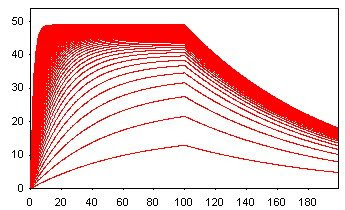
"generate_100_200_0.25.mdl" means
- Number of curves: 100
- Total time: 200 seconds
- Sample interval: 0.25
- Concentration is 1, 0.99, 0.98~0.01
- Injection time: 100 seconds
Generate simulation file with noise fast,
- Selection add noise, choose the value you want
- Save the file to be "Save sim"
- Click model page
- Press Simulation again
- You will recover the data with no noise
Thursday, February 5, 2009
Free anti-virus software 免費的防毒軟體
Famous software are with Initial-A.
有名的軟體有三A....
AVG
The free version is almost free function....
不推薦,免費版幾乎沒功能...
Avira
除了有廣告之外,評價都還不錯。
It's a good software, except the embeded advertisement.
Avast
Eng Registration - http://www.avast.com/eng/home-registration.php
Avast記得要註冊,每過一年重新註冊一次。
Remember to regist your avast home, and apply it again after one year.
Not bad collection
Comodo
ClamAV
Eng - http://w32.clamav.net/
Opensource anti-virus software. Interesting! Also with linux version.
ThreatFire
Saturday, December 20, 2008
hamachi 無法登入
keywords
hamachi 伺服器拒絕您的登入請求
hamachi:Mediation server has rejected your login request
建議就是反安裝後,重新安裝。
檢查一下是否完全清除了。
或是反安裝完後,
下載http://files.hamachi.cc/priv/hamachi-purge.reg
或是參照上面兩個網頁的說明即可。
灰熊好用。
連上線後,自己建立網路或是加入別人的,
連接好後,就可以用Hamachi的IP來玩Diablo, Starcraft, Warcraft等遊戲了。
SC和WC都是使用區域網路,有搜尋到遊戲,就可以加入遊戲。
Diablo則是輸入開遊戲的人的Hamachi IP就可以了。
Thursday, October 23, 2008
網頁版的遠端桌面-Windows Remote Desktop by Web Browser
Windows Remote Desktop by Web Browser
愛台灣
Provided from Taiwan
愛英國
Provided from UK
http://www.bridgwater.ac.uk/tsweb/也可以自己架,
You also provide the web version of remote desktop by yourslef.
1.Open Control Panel click Add or Remove Programs, and then click Add/Remove Windows Components.
--打開"控制台",點選"新增或移除程式",左邊選"新增移除windows元件"。
2.Click Internet Information Services, and then click Details.
--點選"Internet Information Services",按一下"詳細資料"。
3.In the Subcomponents of Internet Information Services list, click World Wide Web Service, and then click Details.
--點選"World Wide Web Service",按一下"詳細資料"。
4.In the Subcomponents of World Wide Web Service list, select the Remote Desktop Web Connection check box, and then click OK.
--點選"遠端桌面網站連線",其它的不用就別選擇,例如"SMTP Service"和"文件",有些元件和遠端桌面有相依性,會跳出警告,那種就不用刪除。
5.In the Windows Components Wizard, click Next. Click Finish when the wizard has completed.
--按下OK後,可能會需要windows光碟,所以記得要準備。
6.Click the Start button and click Run. Type Net Stop w3svc, and click OK. This temporarily stops the World Wide Web service to keep your system safe while you update it with security patches.
--最後是安全性的考量,按下開始的"執行",輸入"Net Stop w3svc",就會停止WWW service。
2nd step,接下來,
1.Click Start, point to All Programs, click Microsoft Update, and then click Scan for updates. Follow the prompts to install all critical updates. If prompted, restart your computer.
去更新一下windows,如果有需要就重開機。
2.Click Start, and then click Run. Type Net Start w3svc, and click OK. This starts the World Wide Web service.
按下開始的"執行",輸入"Net Start w3svc",就會重新啟動WWW service。
3rd step, 再來,
1.Open Control Panel, click Performance and Maintenance, and then click Administrative Tools. Double-click Internet Information Services.
--打開"控制台",點選"系統管理工具",點選"Internet Information Services"。
2.In the ISS snap-in, expand your computer name, expand Web Sites, right-click Default Web Site, and then click Properties.
--展開選項,看到"預設的網站",按右鍵選"內容"。
3.On the Web Site tab, change the value for TCP Port. Enter a number between 1000 and 65535 that you can remember easily, such as the month and day of a birthday or anniversary. You'll need to know the TCP Port when you connect to the computer in the future.
--將TCP連接埠改為希望的port。
4.Click OK, and close the Internet Information Services snap-in.
OK的啦~
....結果我沒成功...搞屁...改天再來試....
修改遠端桌面的port
遠端桌面預設的port是3389,因為是公開的資訊。
如果能修改登入port,對於安全性也不無小補,也會讓外行人覺得好像很專業?XD
步驟如下,
1.開始->執行->輸入regedit->確定2.HKEY_LOCAL_MACHINE\System\CurrentControlSet\Control\Terminal Server\Wds\Repwd\Tds\Tcp中的PortNumber用十進位改成你想要的Port。(1000~65535)
3.HKEY_LOCAL_MACHINE\System\CurrentControlSet\Control\Terminal Server\WinStations\RDP-Tcp中的PortNumber用十進位改成你想要的Port。(1000~65535)
4.記得修改防火牆上的設定,新增一個連接埠,輸入剛剛TCP Port。
這樣便完成Server端設定。
至於client端就只要在後面加上192.168.0.1:xxxx,xxxx為剛設的TCP Port,這樣就可以正常使用了。
5. 重開機確保一切正常。
參考至http://server.everfine.com.tw/blog/archives/2005/06/terminal_server.html
Wednesday, October 15, 2008
關掉windows遇到嚴重問題的自動重開機功能
當Windows XP遇到嚴重問題時便會突然重新開機(藍白畫面),可從注冊表將此功能取消。打開注冊表編輯器(在執行輸入regedit),找到“HKEY_LOCAL_MACHINE\SYSTEM\ CurrentControlSet\Control\CrashControl\”將AutoReboot鍵的Dword值更改為0,重新啟動後設置即可生效。
藍白畫面的資訊對照,可參考http://teachers.tssh.tpc.edu.tw/cc2/bcc/bios&fddisk/%E7%9C%8B%E6%87%82%E8%97%8D%E8%89%B2%E7%95%AB%E9%9D%A2.htm
CPU都會有L2 cache,但是WINXP不會自動偵測設定。
同樣進入到regedit,找到“HKEY_LOCAL_MACHINE\SYSTEM\ CurrentControlSet\Control\SessionControl\MemoryControl\",將SecondLevelDataCache的Dword值改為你的CPU的L2 cache值,單位是kB,建議用10進位。
Friday, August 1, 2008
測試網站功能是否正常
可以採用telnet^serverDNS/serverIP^port_number,
中間^使用空白代替。
若順利連線,會看到一片漆黑的畫面,輸入大寫GET,會回傳訊息。
若正常,就會看到該網頁的原始碼。
JSP,html,smtp等,都適用。
中間^使用空白代替。
若順利連線,會看到一片漆黑的畫面,輸入大寫GET,會回傳訊息。
若正常,就會看到該網頁的原始碼。
JSP,html,smtp等,都適用。
Tuesday, July 15, 2008
讓舊版office可以讀取office2007的相容套件
此套件可以讓Office 2000、Office XP 或 Office 2003可以讀取Office 2007的Word、Excel,或 PowerPoint 2003,下載頁面和注意事項在下面URL中。
http://www.microsoft.com/downloads/details.aspx?displaylang=zh-tw&FamilyID=941b3470-3ae9-4aee-8f43-c6bb74cd1466
http://www.microsoft.com/downloads/details.aspx?displaylang=zh-tw&FamilyID=941b3470-3ae9-4aee-8f43-c6bb74cd1466
Sunday, March 2, 2008
login then nothing happen. 登入沒反應
If you log in one website, nothing happen. But you use another PC and login successfully, you can delete your cookie and try it again.
如果你登入網站,輸入帳號密碼沒錯,換一台電腦卻進得去,可以嘗試刪除cookie唷~
如果你登入網站,輸入帳號密碼沒錯,換一台電腦卻進得去,可以嘗試刪除cookie唷~
檔名太長,無法刪除. file name is too long to delete.
I met a problem about dealing with the files which is generated by some programs, like weka.
If the name of the files are too long, I found that I can't delete them.
http://support.microsoft.com/kb/320081/zh-tw
There some hits about the problems in the above URL.
It mentioned about using another tools which can browse files with long path.
So I use some kinds of file manager software, named free commander, it works.
Its download page is http://www.freecommander.com/.
And there are a lot's kinds of file managers, I think they are all able to delete the files with long path or long name.
前幾週我遇到了一些問題,手殘的我,為了跑實驗,跑出了一堆有很長名字的檔案。
結果發現砍不掉,後來查了一些訊息,得知可以使用其它可以讀取長路徑的檔案管理程式來處理。
很剛好的,為了整理論文,所以我灌了free commander這個軟體,發現真的可以刪除了。
好家在,不然桌面上好多檔案都刪不掉,好醜啊~謝天謝地~
If the name of the files are too long, I found that I can't delete them.
http://support.microsoft.com/kb/320081/zh-tw
There some hits about the problems in the above URL.
It mentioned about using another tools which can browse files with long path.
So I use some kinds of file manager software, named free commander, it works.
Its download page is http://www.freecommander.com/.
And there are a lot's kinds of file managers, I think they are all able to delete the files with long path or long name.
前幾週我遇到了一些問題,手殘的我,為了跑實驗,跑出了一堆有很長名字的檔案。
結果發現砍不掉,後來查了一些訊息,得知可以使用其它可以讀取長路徑的檔案管理程式來處理。
很剛好的,為了整理論文,所以我灌了free commander這個軟體,發現真的可以刪除了。
好家在,不然桌面上好多檔案都刪不掉,好醜啊~謝天謝地~
Subscribe to:
Posts (Atom)
Clicky

